With over 2.7 billion monthly users, YouTube is the largest video-sharing platform in the world.
YouTube can be one of the best things on your child's device — a classroom, a library, and genuine entertainment, all in one app.
It can also, in the space of a few autoplaying videos, take them somewhere you never would have chosen. Recommendations shift. Shorts feeds don't stop unless someone tells them to. And even the best automated safety systems miss things — YouTube says so itself.
So the real question isn't whether your kid should use YouTube. It's how you build a safer experience around them — one that doesn't rely on you reconfiguring a settings menu every few months and hoping it still matches who they are.
Here's what that actually takes.
It's Not Simply "Screen Time"
For a decade, the standard advice was a number: two hours of screen time a day, at max. It's simple, memorable, and repeated by paediatricians everywhere.
But in January 2026, the American Academy of Paediatrics retired it.
In a new policy statement, Digital Ecosystems, Children, and Adolescents, published in the February 2026 issue of Pediatrics, the AAP moved away from a fixed hourly limit entirely. Lead author Dr Tiffany Munzer's reasoning: many platforms are built around keeping users engaged for as long as possible, and that business model — not the clock — is what actually disrupts a child's sleep, mood, and learning. Counting hours was never measuring the thing that mattered.
In its place, the AAP recommends the 5 C's of Media Use — Child, Content, Calm, what the media Crowds out, and Communication.
Picture two kids who each spend an hour on YouTube: one works through a curated playlist their parent picked; the other free-falls from one autoplay to the next with no idea what's coming. Both spend the same hour, but with completely different experience. A time limit can't tell those apart. The 5 C's can.
There's a deeper point buried in that policy statement worth sitting with: the AAP frames healthy media use as something that has to adapt continuously to who a specific child actually is right now — not a rule set once and left alone. That idea is going to come up again.
What YouTube's Own Tools Actually Cover
YouTube gives parents more here than most people realise. It's definitely worth knowing what's actually available before deciding what's missing.
Three separate systems, not two:
YouTube Kids — a standalone app for younger children, with a smaller, curated library and four content tiers: Preschool (4 and under), Younger (5–8), Older (9–12), and a fully manual "Approve content yourself" allowlist.
A supervised kid account — a regular YouTube account for a child under 13, set to Explore (roughly 9+), Explore more (roughly 13+, read-only comments), or Most of YouTube (everything but 18+).
A supervised teen account — for 13–17, where the teen opts in to link their account for extra oversight. Worth noting: that's a choice they keep making, not something that just continues automatically past 13.
Fast reference for the rest:
Search can be switched off entirely in YouTube Kids, limiting a child to what's already been surfaced for them.
Blocking a channel or video in YouTube Kids syncs automatically to a linked supervised account — one action, not two.
Shorts now has a real daily limit (Settings → Time management → Shorts feed limit). On a standard account,
it's dismissible with an "Ignore" button. On a supervised teen account it isn't — and since March 2026, parents can set it to zero minutes. Worth knowing: zero stops the endless scroll feed, but individual Shorts can still surface in search or on a channel page. It's a strong control, not a total blackout.
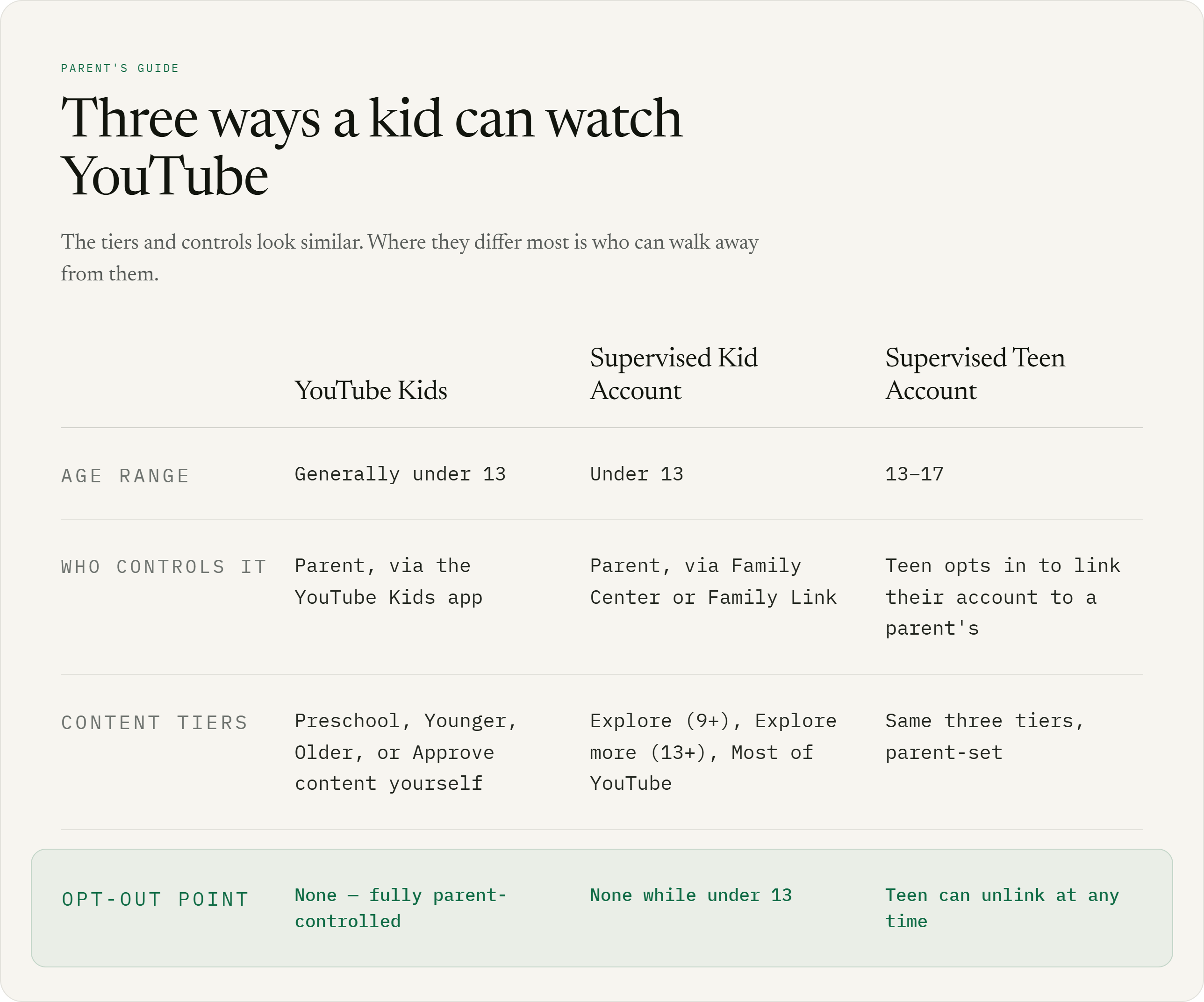
[Comparison graphic: YouTube Kids vs. supervised kid account vs. supervised teen account — age range, who controls it, content tiers, opt-out point]
Where the Built-In Tools Run Out
YouTube's built-in controls are a valuable first layer of protection, but they mostly answer one question: "Is this content appropriate for my child?"
Parents often need to ask more.
A video can be completely safe yet still be clickbait, low-quality, distracting, or designed to keep a child watching longer than they intended.
A child might open YouTube for a 10-minute maths lesson, watch it, then follow a recommendation, then another, then a Short. Forty minutes later, they're still watching.
Nothing necessarily violated a safety policy. The problem was the experience.
That's because YouTube isn't just a collection of videos. Recommendations, thumbnails, autoplay and endless feeds all influence what a child watches next.
Context matters too. An hour of YouTube after homework is different from an hour that replaces homework or cuts into sleep.
So effective digital wellbeing isn't only about what a child sees. It's also about why, when and how they're using it.
YouTube provides a strong baseline, but families may want something more personalised — something that considers the individual child, their goals and their habits.
Keeping kids safe online isn't only about blocking what they shouldn't see. It's also about helping them get more value from what they do see.
This Is the Gap Nourous Closes
That last idea — more value from what they do see, not just less exposure to what they shouldn't — is exactly where Nourous picks up. It's a Chrome extension paired with a dashboard, built specifically for YouTube, working underneath the account settings above rather than replacing them.
A few concrete things that look like:
It reads for quality, not just appropriateness. Alongside the safety check on thumbnails, a separate classifier tags videos as clickbait, ragebait, or low-value — the categories that turn a 10-minute lesson into a 40-minute autoplay chain.
It protects the good stuff. Text and thumbnail signals are weighed together, not against one blunt rule — an educational video with a baity thumbnail doesn't get filtered just because the thumbnail looks like clickbait.
It has real gradations, not a block/allow switch. A flagged video can be blurred with a click-to-reveal warning instead of removed outright, and each profile's Restriction Level — Soft, Controlled, or Strict — sets how much benefit of the doubt it gets, per child, not per account.
Schedules enforce themselves. School-hours and bedtime windows run on the extension itself, not as a reminder that's one tap to dismiss.
A blocked video isn't a dead end. A child can request access to something that's blocked, and a parent approves or denies it remotely with a time limit attached — or, if they're right there, loosens things themselves for a set window, no request needed.
The weekly report is honest about what it doesn't know yet. If the filter wasn't active for enough of the week to draw real conclusions, the report says so plainly instead of showing a chart that looks more confident than the underlying data supports.
It shows where the time actually went, not just how much there was. The weekly breakdown splits viewing into Learning, Entertainment, Shorts, and Uncategorized — the "why, when, how" from above, made visible instead of theoretical.
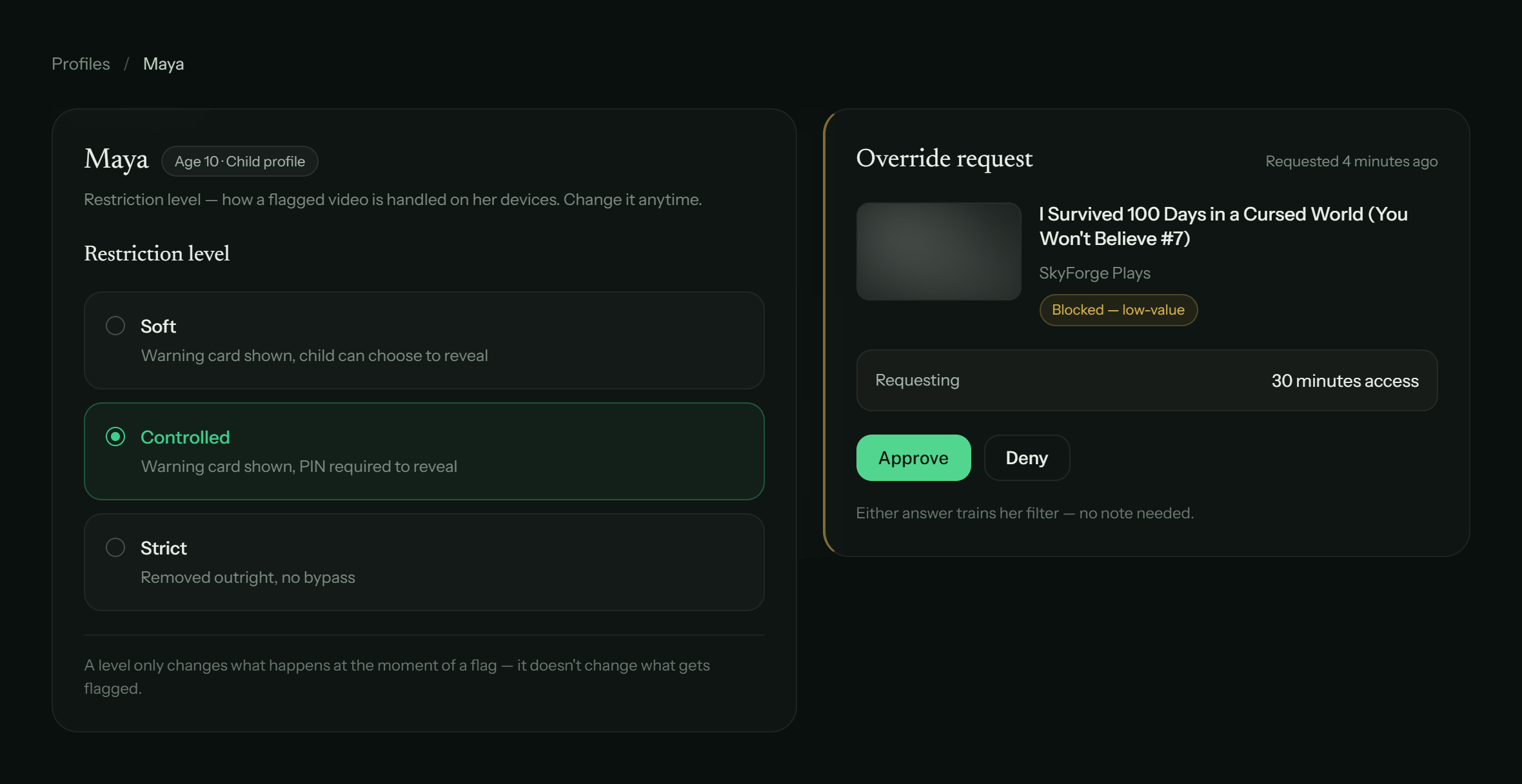
[Screenshot: Nourous parent dashboard — a profile's Restriction Level next to an incoming override request]
The analysis behind all of this runs on the device — raw video titles and the underlying model never leave it, only the finished weekly summary does. Personal use is free forever; the parent-oversight tier comes with a 14-day free trial, no card required.
None of this replaces the conversation in the section above. The request-to-unlock flow is really that conversation, built into the product instead of left to happen — or not — somewhere else.
Would You Want This on Your Kid's YouTube?
Not a to-do list this time — just check the ones you'd actually want, if they existed for your kid's YouTube today.
Would you want this on your kid's YouTube?
0 of 7The Bigger Goal
The internet isn't going anywhere, and kids eventually need to move through it without a parent standing over their shoulder. The goal was never the biggest possible wall around one device — it's better boundaries, then better habits, then real independence.
YouTube's own tools can genuinely help with that, used well — they're more capable than most parents realize, and worth actually setting up rather than skipping. But a platform's settings can really only ever answer one question at a billion-account scale: is this content allowed. A tool built around nothing but getting YouTube right for one specific kid can ask a second question too — is this actually worth their time — and give them a way to ask instead of just being told no.
That's the idea behind Nourous. Technology should work for your family — not the other way around.
Frequently asked questions
Is YouTube safe for kids?
There's no clean yes or no. YouTube Kids and supervised accounts give parents real, meaningful controls, but Google is upfront that its automated content systems make mistakes and don't manually review everything.
What does Nourous actually do?
It reads every video for quality, not just safety — catching clickbait, ragebait, and low-value content that's technically fine but still built to keep a kid scrolling. Each child gets their own restriction level, flagged videos blur with a reason attached instead of just disappearing, and a weekly report shows where the time actually went — Learning, Entertainment, Shorts, and everything in between — instead of just a total number. If something gets blocked that shouldn't have been, your kid can ask for access instead of hitting a wall.
How much does Nourous cost?
Personal use is free forever — no card, no limits on the core filtering. The parent-oversight tier comes with a 30-day free trial and no card required to start. Then $1.99/month.
Does Nourous send my kid's viewing history anywhere?
No. Filtering decisions run on the device by default — raw video titles and the model doing the analysis never leave it. Only the finished weekly summary syncs to the dashboard.
If I've already set up YouTube's parental controls, do I still need something like Nourous?
Nourous runs alongside those settings, not instead of them — your account tier, blocked channels, and Shorts limit all keep working exactly as you set them. It adds the layer YouTube's tiers don't cover: content quality, weekly reporting, and a way for your kid to ask instead of just hitting a wall.
Is Nourous only for parents, or can I use it myself?
Both. Personal mode is self-managed — no PINs, no oversight, fully reversible — for reclaiming your own attention. Parent mode adds profiles, restriction levels, and reporting for a child's account.
What happens if Nourous blocks something it shouldn't have?
Your kid can request access, and you approve or deny it remotely with a time limit attached. Approving a video also trains the filter by allowing the video and other similar ones.
Does Nourous work on platforms besides YouTube?
Today, YouTube only. Support for other platforms — Instagram, Facebook, X, and more — along with coverage that follows a kid across devices, is on the roadmap, not live yet.
Comments